What's Chizzle?
Creating bevelled text in Blender is unexpectedly a big hassle. Default bevel options are too limited, produce bad topology, and for some reason, almost always return non-manifold geometry with artifacts on most fonts.
If you have ever searched for "how to make Chiseled text" in Blender, you will find answers asking you to either model the geometry manually in Edit Mode, or do it in Adobe Illustrator and export it back to Blender. Both of these solutions are destructive, not scalable, and take tons of time.
Chizzle makes this process insanely simple. It harnesses the power of Geometry Nodes to give you a customizable, procedural, and non-destructive solution that eliminates the hassle entirely.
Endless Customization
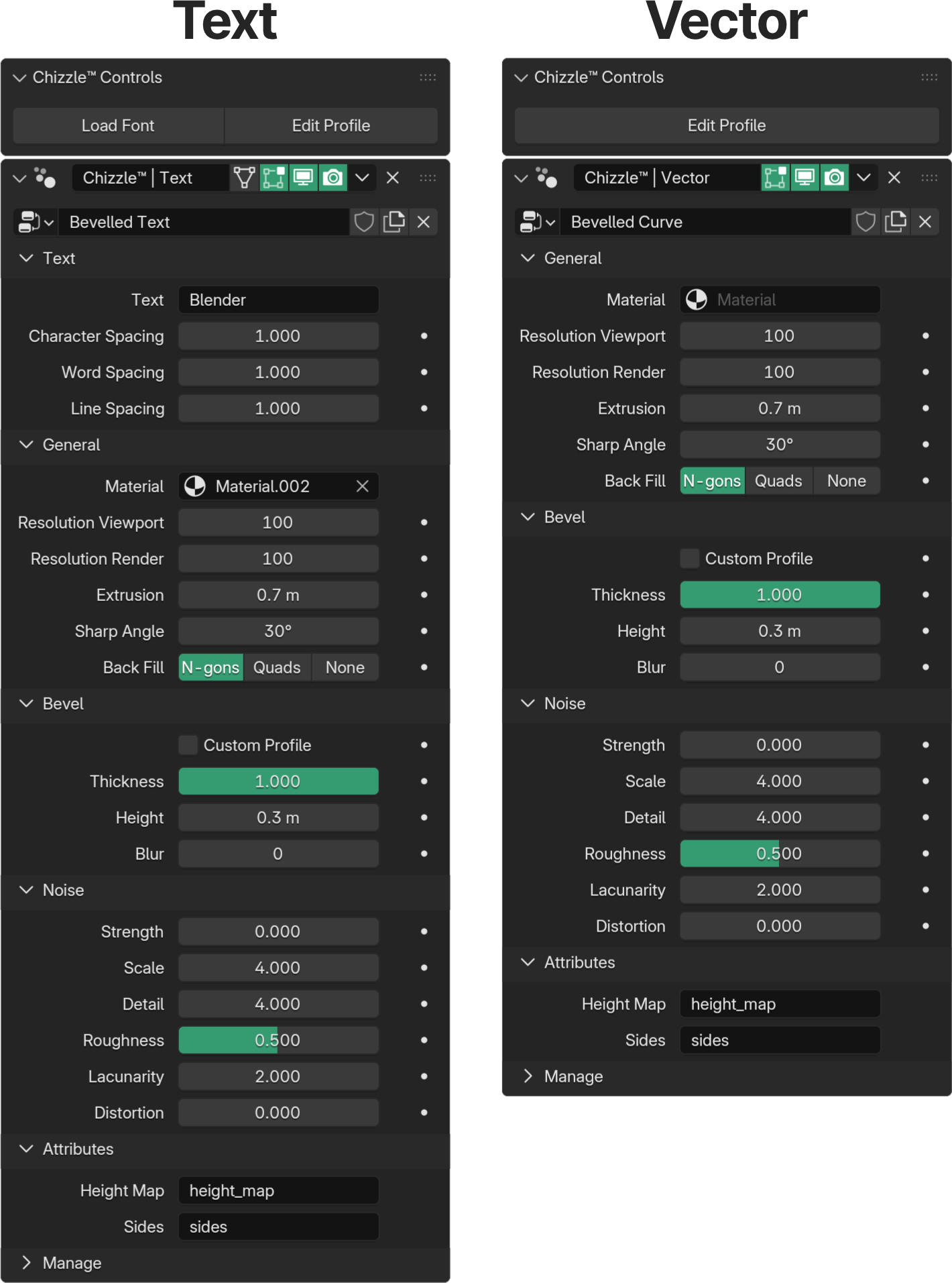
Because Chizzle is powered by Geometry Nodes, you get full control directly inside the Modifiers tab. Every setting is neatly organized into categories, keeping your interface clean and your workflow stress-free.
Chizzle gives you control over just about everything in your model. You can tweak the simple stuff, like tightening up letter spacing or pumping up the extrusion depth, or go deep on those procedural noise settings if that's your thing. So if you're after a razor-sharp modern style or a crusty, ancient stone feel, the interface is so straightforward you'll have your perfect look locked down in seconds.
Procedural Power
Check out this quick demo of tweaking the settings. Since it's completely non-destructive, you are free to change the actual text content whenever you want.
Why Chizzle?
Chizzle is designed to feel like a native Blender feature. It integrates seamlessly into the Add menu and the modifier stack. Whether you are doing motion graphics, architectural visualization, or stylized art, Chizzle handles the typography so you can focus on the composition.
✅ Vector & SVG Support
It works on more than just text! Select "Add > Chisel > Vector" to apply the same powerful beveling and texturing engine to imported SVG files. Logos and icons become 3D objects instantly, with the same non-destructive controls you use for fonts.
⚡ Performance Optimized
Heavy geometry can slow down your viewport. Chizzle includes separate controls for Resolution Viewport and Resolution Render. Keep your scene snappy while you work at 10% resolution, but export crisp, high-poly meshes when you hit render.
🔷 Advanced Bevel Profiles
Don't settle for a simple 45-degree angle. Use the Blur, Height, and Thickness sliders to craft the perfect edge. Whether you need a sharp mechanical chamfer or a soft, bubbly edge, the controls are right at your fingertips.
⛏️ Built-in Noise
Perfect 3D text is boring. That's why Chizzle includes a robust Noise engine directly in the interface. Add Roughness, Distortion, and Detail to your text to create weathered stone, organic surfaces, or stylized imperfections without setting up a single shader node.
See it in action
Interact with this live 3D preview to see the procedural bevels up close.
The Creator
With over 1K total downloads on my addons, you are guaranteed to get a high quality product at a reasonable price!